
Everything InboxAgent does.
For businesses that run on email, on the mailboxes you already have.
A plain-English tour of what the product does today, connect, sort, route, and let you see it is all being handled, and what's coming next. No invented features: this reflects what actually ships.

Works on the mailbox you already run.
Gmail, Google Workspace & Microsoft 365 shared mailboxes
Connect a shared mailbox you already use, info@, sales@, support@ on Gmail and Google Workspace, or Outlook and Microsoft 365, by secure sign-in. InboxAgent reads and sorts in place; nothing is moved or migrated, and access is read-only (it never sends mail or changes your inbox). Connect as many mailboxes as leads arrive in: the shared ones, and each salesperson's or account manager's own.
Zoho Mail and your own domain too
Zoho Mail: if your business runs on Zoho, connect your mailbox with a simple Sign in with Zoho.
Any business mailbox on your own domain: InboxAgent connects over IMAP, the standard email connection most business mailboxes support. Your info@ address stays where it is, on your own domain with your hosting company, and InboxAgent reads it with no need to move your email.
Immediate context on day one
On first connection it pulls a short recent window of mail so it has context straight away, then works on everything new from that point. It's a live sorting layer, not an archive, there's no giant backfill to wait through.
Real leads and service requests never get lost in the noise.
Noise filtered first
Obvious noise, newsletters and bulk mail, known marketing senders, auto-replies, is caught by deterministic detectors and set aside before the AI is ever called, with every decision recorded.
AI classification with a reason
The rest is classified by AI into sales lead, service request, marketing/notification/spam, or "needs review", each with a confidence score and a short, plain-language reason for the call. That is what AI-led email triage looks like in practice: it classifies and explains, and never writes replies or talks to your customers.
Your rules override the AI
Admins can set rules that take precedence, match on sender (customer, VIP, known, blocked, or domain), on subject or body text, or on the AI's own category and confidence, and force the outcome (lead, ticket, review, or ignore). Rules are yours, priority-ordered, and fully auditable.
Unsure? A human sees it
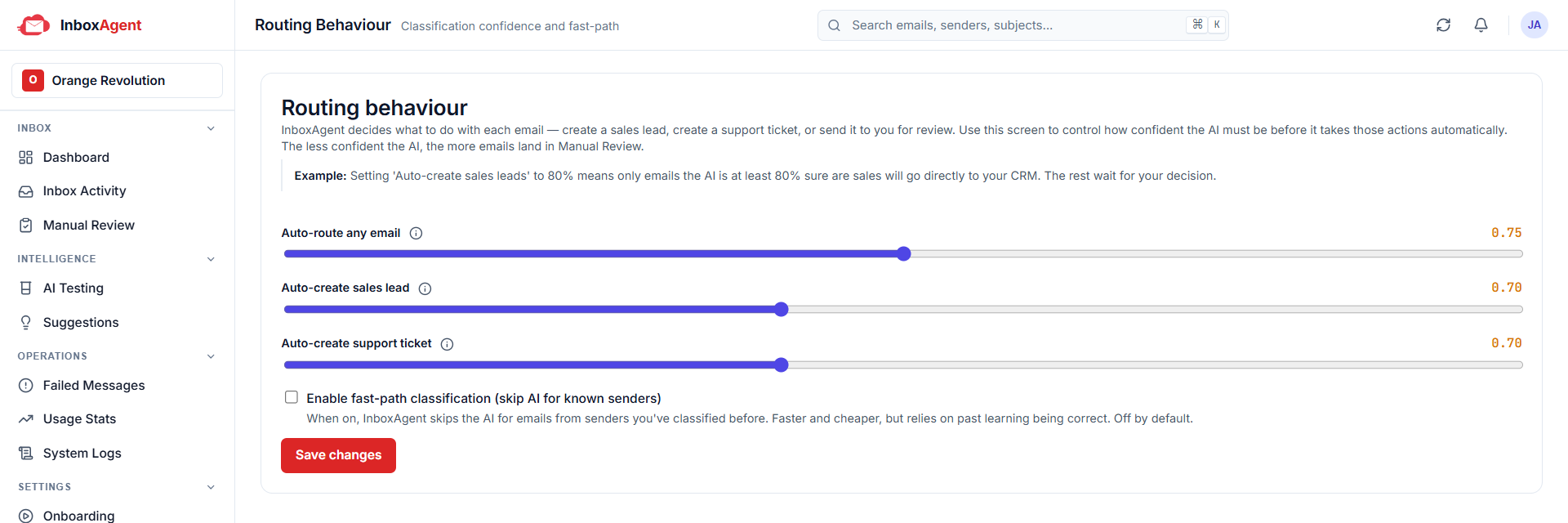
You set a confidence bar, overall, and separately for sales and support. Anything below it goes to a human review queue rather than being guessed, where a reviewer can approve it as a lead or ticket, ignore it, or pass it on.
Every email gets an owner and a state.
Leads board
Every sales inquiry becomes a lead, classified from the mailbox with the original email attached, and moves through your stages to Won or Lost. Leads that arrived by WhatsApp or phone can be added by hand.
- Your stages, your names. Rename, reorder, add and remove the stages a lead moves through. New, Won and Lost stay fixed at the ends.
- Up to ten fields of your own on a lead, for whatever you need to record.
- Things to do, with a due date. Overdue items are flagged in the app.
- Export your leads to CSV at any time.
Follow-ups
Everything that needs a person and is not a sale lands in Follow-ups with an owner and notes. You choose what lands there automatically: service requests to begin with, and invoices, renewals, automated notices, partnership approaches, job applications or legal notices if you want them. Any email can be moved there in one click from Inbox activity. Each one is Open until someone marks it Done.
Clean records into the tools you already use.
Your boards work on their own. If you use Zoho or HubSpot, every lead and service request flows there as well, and connecting one later changes nothing.
Leads into Zoho CRM
Creates or updates a lead in Zoho CRM. If a matching contact or open lead already exists for that sender, it adds a note to the existing record instead of creating a duplicate.
Tickets into Zoho Desk
Creates a support ticket in Zoho Desk, finding or creating the contact, assigning the department, and returning the ticket reference.
Or connect HubSpot instead
One HubSpot connection covers both sides. A support email becomes a ticket with the sender attached, a reply becomes a note on that ticket, and a sales inquiry becomes a contact and a deal. It works on every HubSpot plan, including the free one. Zoho and HubSpot today, more integrations coming.
Conversations, not duplicates
InboxAgent tracks which thread has already become a record. A later reply on a support thread continues the same Desk ticket; a reply tied to an existing CRM lead is recognized as already-handled rather than creating a second one, so your downstream data stays clean on its own.
Nothing is a black box.
Reviewed by Google, read-only by design
Reading a customer's mailbox uses Google's restricted scopes, which require passing Google's verification, including an independent, third-party security assessment (CASA). We've completed it. Access is read-only throughout: InboxAgent reads to classify and route, and never sends mail or changes your inbox.
A decision history for every message
For each message you can see what it was classified as, the confidence, the reason, what action was taken, whether it succeeded, and the record it created in the connected system.
Failed actions are caught and retried
If a downstream step fails, say Zoho is briefly unavailable, the message is captured with the error and can be retried, so work isn't silently lost.
A dashboard across every mailbox
See your connected mailboxes and the outcome counts, emails seen, leads created, tickets created, sent to review, skipped, plus recent activity with category, confidence and status. It's quality control for the business, not just automation for the team. Notifications flag anything that needs attention, and an in-app Help Center is a click away.
It gets sharper, and the intelligence stays.
Your corrections become rules
When your team keeps correcting the AI the same way, InboxAgent spots the pattern and proposes a rule. An admin reviews and approves it, and from then on the engine applies it, so the system learns from your team's judgment, with a human in control.
The intelligence belongs to your business
The rules and learning live in the system, not in one person's head, they don't walk out the door when a salesperson leaves.
Built for teams, isolated and secure
Each organization's data is strictly isolated. Sign in with two-step verification, and give people the right level of access: Admin, Member and Viewer roles, with the option to restrict any member to specific mailboxes. Access tokens are encrypted at rest, inbox access is read-only, and on account closure your data is deleted on a defined schedule.
One front door per channel.
InboxAgent is the front door for your email. The same sort-and-route engine is coming as its own products for other channels, use them on their own or together.

InboxAgent Mail
Available nowSort and route every email on the shared mailbox you already use, the product on this page.

InboxAgent Voice
Coming soonSort and route the calls and voicemails your business receives, so the important ones reach the right person fast.

InboxAgent WhatsApp
Coming soonSort and route the WhatsApp messages your business receives, sending each one to the right place automatically.