
Everything InboxAgent does.
A plain-English tour of what the product does today — connect, sort, route, and let the owner see it's all being handled — and what's coming next. No invented features: this reflects what actually ships.

Works on the mailbox you already run.
Gmail & Microsoft 365 shared mailboxes
Connect a shared mailbox you already use — info@, sales@, support@ on Google Workspace or Outlook / Microsoft 365 — by secure sign-in. InboxAgent reads and triages in place; nothing is moved or migrated, and access is read-only (it never sends mail or changes your inbox).
Immediate context on day one
On first connection it pulls a short recent window of mail so it has context straight away, then works on everything new from that point. It's a live triage layer, not an archive — there's no giant backfill to wait through.
Rules and AI work out what each message is.
Noise filtered first
Obvious noise — newsletters and bulk mail, known marketing senders, auto-replies — is caught by deterministic detectors and set aside before the AI is ever called, with every decision recorded.
AI classification with a reason
The rest is classified by AI into sales lead, support ticket, marketing/notification/spam, or "needs review" — each with a confidence score and a short, plain-language reason for the call. It classifies and explains; it never writes replies or talks to your customers.
Your rules override the AI
Admins can set rules that take precedence — match on sender (customer, VIP, known, blocked, or domain), on subject or body text, or on the AI's own category and confidence, and force the outcome (lead, ticket, review, or ignore). Rules are yours, priority-ordered, and fully auditable.
Unsure? A human sees it
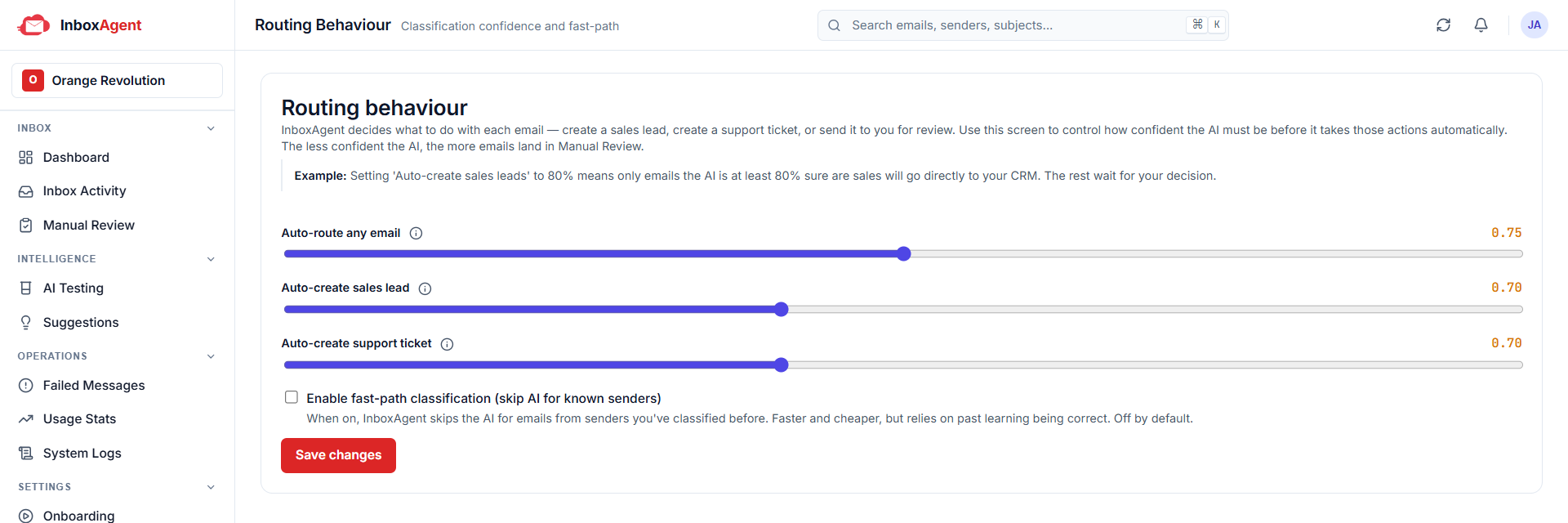
You set a confidence bar — overall, and separately for sales and support. Anything below it goes to a human review queue rather than being guessed, where a reviewer can approve it as a lead or ticket, ignore it, or pass it on.
Clean records into the tools you already use.
Leads into Zoho CRM
Creates or updates a lead in Zoho CRM. If a matching contact or open lead already exists for that sender, it adds a note to the existing record instead of creating a duplicate.
Tickets into Zoho Desk
Creates a support ticket in Zoho Desk — finding or creating the contact, assigning the department, and returning the ticket reference. Zoho is the first integration, not the only planned one; the list grows with customers.
Conversations, not duplicates
InboxAgent tracks which thread has already become a record. A later reply on a support thread continues the same Desk ticket; a reply tied to an existing CRM lead is recognised as already-handled rather than creating a second one — so your downstream data stays clean on its own.
Nothing is a black box.
A decision history for every message
For each message you can see what it was classified as, the confidence, the reason, what action was taken, whether it succeeded, and the record it created in the connected system.
Failed actions are caught and retried
If a downstream step fails — say Zoho is briefly unavailable — the message is captured with the error and can be retried, so work isn't silently lost.
An owner's-eye dashboard
See your connected mailboxes and the outcome counts — emails seen, leads created, tickets created, sent to review, skipped — plus recent activity with category, confidence and status. It's quality control for the owner, not just automation for the team.
It gets sharper, and the intelligence stays.
Your corrections become rules
When your team keeps correcting the AI the same way, InboxAgent spots the pattern and proposes a rule. An admin reviews and approves it, and from then on the engine applies it — so the system learns from your team's judgement, with a human in control.
The intelligence belongs to your business
The rules and learning live in the system, not in one person's head — they don't walk out the door when a salesperson leaves. And every customer benefits from what the platform learns across organisations, at no extra cost.
Built for teams, isolated and secure
Each organisation's data is strictly isolated. Roles (Admin, Member, Viewer) gate destructive and connection actions. Access tokens are encrypted at rest, inbox access is read-only, and on account closure your data is deleted on a defined schedule.
One front door per channel.
InboxAgent is the front door for your email. The same triage-and-route engine is coming as its own products for other channels — use them on their own or together.

InboxAgent Mail
Available nowTriage and route every email on the shared mailbox you already use — the product on this page.

InboxAgent Voice
Coming soonThe same intelligent triage, brought to your inbound phone calls and voicemail.

InboxAgent WhatsApp
Coming soonThe same sorting and routing for the WhatsApp messages your business receives.